
Voidstrap Advanced Roblox Bootstrapper
Voidstrap is a modern Roblox bootstrapper designed for players who want more control over their Roblox experience. While the official Roblox launcher focuses on simplicity, Voidstrap adds advanced customization options, performance tools, launch management features, and quality-of-life improvements that make Roblox easier and more enjoyable to use.
Whether you are a casual Roblox player, a competitive FPS enthusiast, a content creator, or a developer testing different Roblox experiences, Voidstrap provides a centralized interface for managing settings that would otherwise require manual configuration. It combines convenience, flexibility, and customization in a lightweight package designed specifically for Roblox users.
What Is a Roblox Bootstrapper?
A bootstrapper is the application responsible for preparing and launching Roblox on your computer. It handles updates, verifies files, and starts the Roblox client.
The standard Roblox bootstrapper works well for most users, but it offers very limited customization. Advanced players often want additional controls such as:
- Better launch management
- Performance tuning options
- Fast Flags management
- Custom themes and appearance settings
- Discord integration
- Activity tracking
- Advanced Roblox client options
Voidstrap addresses these needs by providing an enhanced bootstrapper experience while maintaining compatibility with Roblox.
Why Choose Voidstrap?
Thousands of Roblox players look for ways to improve their gaming experience without modifying game content or using unfair advantages. Voidstrap focuses on convenience, customization, and user control rather than gameplay manipulation.
Some of the main reasons players choose Voidstrap include:
Key Features
Fast Flags Management
Fast Flags are internal Roblox settings used to enable, disable, or modify certain client behaviors. Advanced users often experiment with Fast Flags to test new features or adjust client settings.
Voidstrap provides a more convenient way to manage Fast Flags compared to manually editing files. Users can organize configurations, apply changes more efficiently, and maintain better control over their settings.
FPS Configuration
Performance is important for many Roblox players, particularly those who play competitive games.
Voidstrap includes FPS-related options that help users manage frame rate settings more effectively. While actual performance improvements depend on hardware specifications and game optimization, Voidstrap provides a centralized location for managing FPS-related configurations.
Discord Rich Presence
Discord has become one of the most popular communication platforms among gamers. Voidstrap includes Discord Rich Presence support, allowing users to display information about their Roblox activity directly on their Discord profile.
This creates a more connected gaming experience and makes it easier for friends to see what you are playing
Theme Support
Customization is one of the most requested features among Roblox players.
Voidstrap offers theme support that allows users to personalize the launcher experience. Different visual styles, layouts, and appearance settings help users create an interface that feels unique and comfortable.
Activity Tracking
Activity tracking features help users keep track of recently played Roblox experiences. This can be useful when returning to favorite games, reviewing activity history, or quickly rejoining previously played experiences
Server Tools
Voidstrap includes features designed to improve server management and game discovery workflows. These tools help users find suitable sessions and improve their overall navigation experience within Roblox.
Designed for Different Types of Players
Voidstrap is suitable for a wide range of Roblox users.
- Casual Players
- Casual players can enjoy a cleaner and more customizable Roblox experience without needing technical knowledge.
- Competitive Players
- Players who focus on reaction time, smooth gameplay, and consistent performance can benefit from FPS-related features and advanced configuration options.
- Roblox Developers
- Developers often test multiple experiences and configurations. Voidstrap provides tools that help streamline testing and launcher management tasks.
- Content Creators
- YouTubers, streamers, and social media creators often appreciate additional customization options that help create a more personalized setup.
User-Friendly Interface
One of Voidstrap’s biggest advantages is its focus on usability. Advanced tools can sometimes become overwhelming, but Voidstrap organizes settings in a way that remains approachable for both beginners and experienced users. Clear navigation, organized categories, and logical layouts help users quickly locate the settings they need without spending unnecessary time searching through menus.
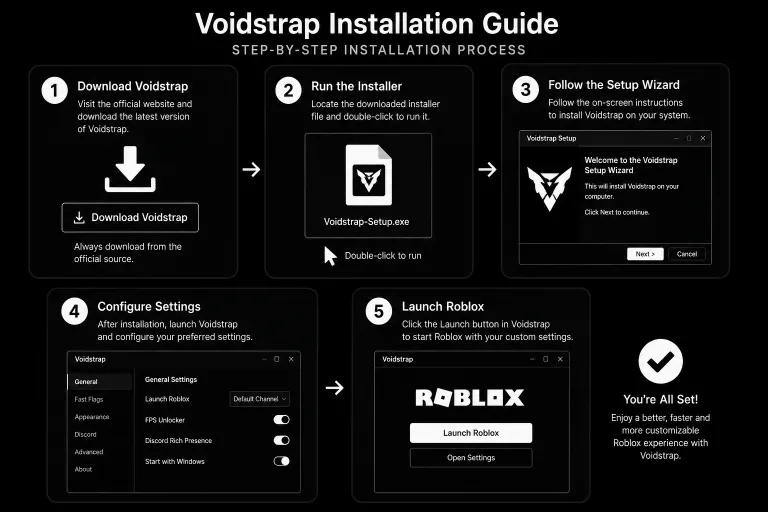
Installation Guide
Getting started with Voidstrap is straightforward.
Step 1: Download Voidstrap
Download the latest version from a trusted source. like voidstra.pro
Step 2: Install Required Components
Depending on your system, you may need Microsoft .NET Desktop Runtime or other required dependencies.
Step 3: Run the Installer
Launch the installer and follow the on-screen instructions.
Step 4: Configure Settings
After installation, open Voidstrap and review available settings. Configure themes, performance options, Discord integration, and other features according to your preferences.
Step 5: Launch Roblox
Start Roblox through Voidstrap and enjoy your customized experience.
System Requirements
Voidstrap is designed to work on modern Windows systems.
Recommended Requirements
| Requirement | Recommended Specification |
|---|---|
| Operating System | Windows 10 or Windows 11 |
| Internet Connection | Stable internet connection |
| Roblox | Latest version installed |
| Runtime | Microsoft .NET Desktop Runtime (if required) |
| Memory (RAM) | 4 GB RAM or higher |
| Processor | Modern Dual-Core Processor or Better |
Safety and Reliability
Many users ask whether Voidstrap is safe to use. Voidstrap is intended to function as a launcher and customization utility. Users should always download software from trusted sources and avoid unofficial modifications distributed through unknown websites. Following standard security practices is important when installing any software. Verify downloads, keep software updated, and avoid sharing sensitive account information.
Common Questions
Final Thoughts
Voidstrap has become a popular choice among Roblox users who want more than the default launcher can provide. By combining customization features, performance-related tools, Discord integration, activity tracking, Fast Flags management, and a user-friendly interface, it delivers a comprehensive launcher experience for a wide range of players.
Whether your goal is improving convenience, organizing settings, personalizing the interface, or exploring advanced Roblox configuration options, Voidstrap provides the tools needed to create a more tailored and enjoyable experience.
Download the latest version of Voidstrap today and discover a more powerful way to launch, manage, and customize Roblox.